Easy way to put human back into the loop of acceptance testing your GitHub work

Make every GitHub pull request testable, traceable, and signed off. Nothing about how your developers work has to change.


CI passing isn’t the same as tested

Teams that move fast often notice the same thing: it’s easy to ship features, but much harder to be really confident it actually works as expected – beyond what automated checks catch. Also, not all PRs are the same: Is there an easy way to acceptance test critical features in an ever-growing number of pull requests each day?

Maybe you don’t have dedicated testers yet in your team, and you’re trying to figure out how one would even fit into a GitHub-centric team. Maybe you have testers assigned, but their work lives in spreadsheets, Notion pages, or a separate tool that nobody on the dev side ever opens.

Either way, the gap is the same: there’s no clear picture of what has been tested by your testers, what hasn’t, and what the current quality situation actually looks like, and how to reuse and share testing-related assets when things grow.

What Testlab does

1. Real testing for your pull requests

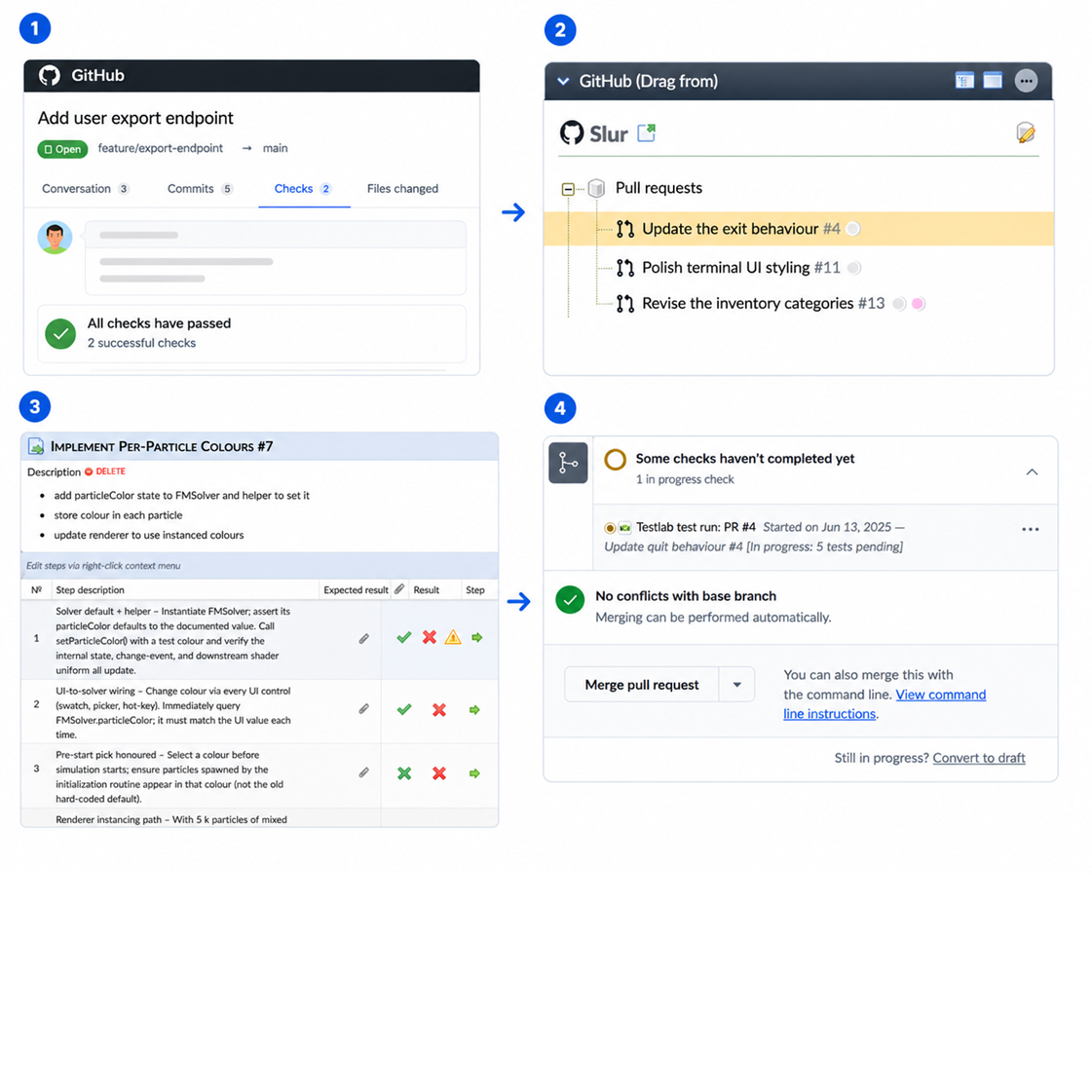
Drag a pull request into Testlab, and you have a test run linked to it. Testers do their work in a proper test execution view — with steps, results, and history — and a live Check appears on the GitHub PR showing exactly where testing stands. Developers never have to ask, “Is someone looking into this yet?” The answer is right there in the Checks tab.

2. AI that suggests what to test

When a PR comes in, Testlab’s AI reads the code changes, the description, the comments, and any linked issues and proposes test cases for it. Never final truths to keep humans in control, just a solid starting point that your testers review and refine. It saves the blank-page moment, especially when a PR touches code a tester hasn’t seen before.

3. One quality picture, shared by everyone

GitHub Issues sync both ways. Labels, milestones, and attachments stay aligned. Testers always see the current state of issues without having to chase updates, and developers see testing status without waiting for a report. Less status-checking, fewer cross-team meetings, and nobody working off stale information.


How it works

Four steps, start to finish.

  1. A developer opens a PR – nothing new on their side.
  2. The PR shows up in Testlab, ready to be picked up for testing.
  3. A tester creates a test run from the PR. If AI is enabled, test cases are proposed automatically — review, adjust, optionally add regression tests from your library, then run them.
  4. Results flow back to GitHub as a check on the PR. Pass, fail, blocked — developers see it where they already work.

See Getting started for instructions on how to try it in 15 minutes. Remember, you can set up labels and branches that filter in only PRs that developers want the team of testers to work on for efficient and easy workflows. 

Development and QA working seamlessly

What developers see in GitHub

  • A Check on every PR picked up for testing, showing testing status
  • Summary of passed, failed, blocked, and pending tests
  • Issues opened during testing, linked directly to the PR
  • A link back to the full test run in Testlab for anyone wanting more details

What testers get in Testlab

  • AI-suggested test cases built from the PR’s actual content
  • A place to add regression tests alongside PR-specific ones
  • Synced GitHub Issues, ready to pull into test runs as cases
  • A proper test execution view with steps, shortcuts, and history

Built and hosted in the EU.

Built for serious development

  • Works with github.com and GitHub Enterprise Server (self-hosted)
  • Technically set up as a standard GitHub App with clean permissions, granular repo access
  • Checks, compatible with branch protection rules – require testing to pass before merge
  • Tested PRs and issues filterable by target branch or label, so you focus on what matters


Start small, use what you need

You don’t have to roll out an ALM platform on day one. Connect one repository, try it on one pull request, and see the loop close in GitHub. That’s enough to get a real feel for how it works – about 15 minutes from sign-up to first Check on your PR.

When you’re ready for more, Testlab is already there: full requirements management, structured test libraries, issue tracking, reporting, and everything else you need as your QA practice matures. Use only the parts you need — the rest stays out of the way until you want them.

Click here to try it for free

No credit card required. Connect your GitHub repo and see the whole loop close — from PR opened to acceptance tested — in an afternoon.