


We are proud to announce a new Testlab version: Lazarus Taxon. This version brings a trash bin to restore deleted assets, drafts for working on the specification without touching the approved one, a new AI assistant pane for test cases, and a REST API for manual testing and reporting.
Please read on for more details on the changes.
Trash bin
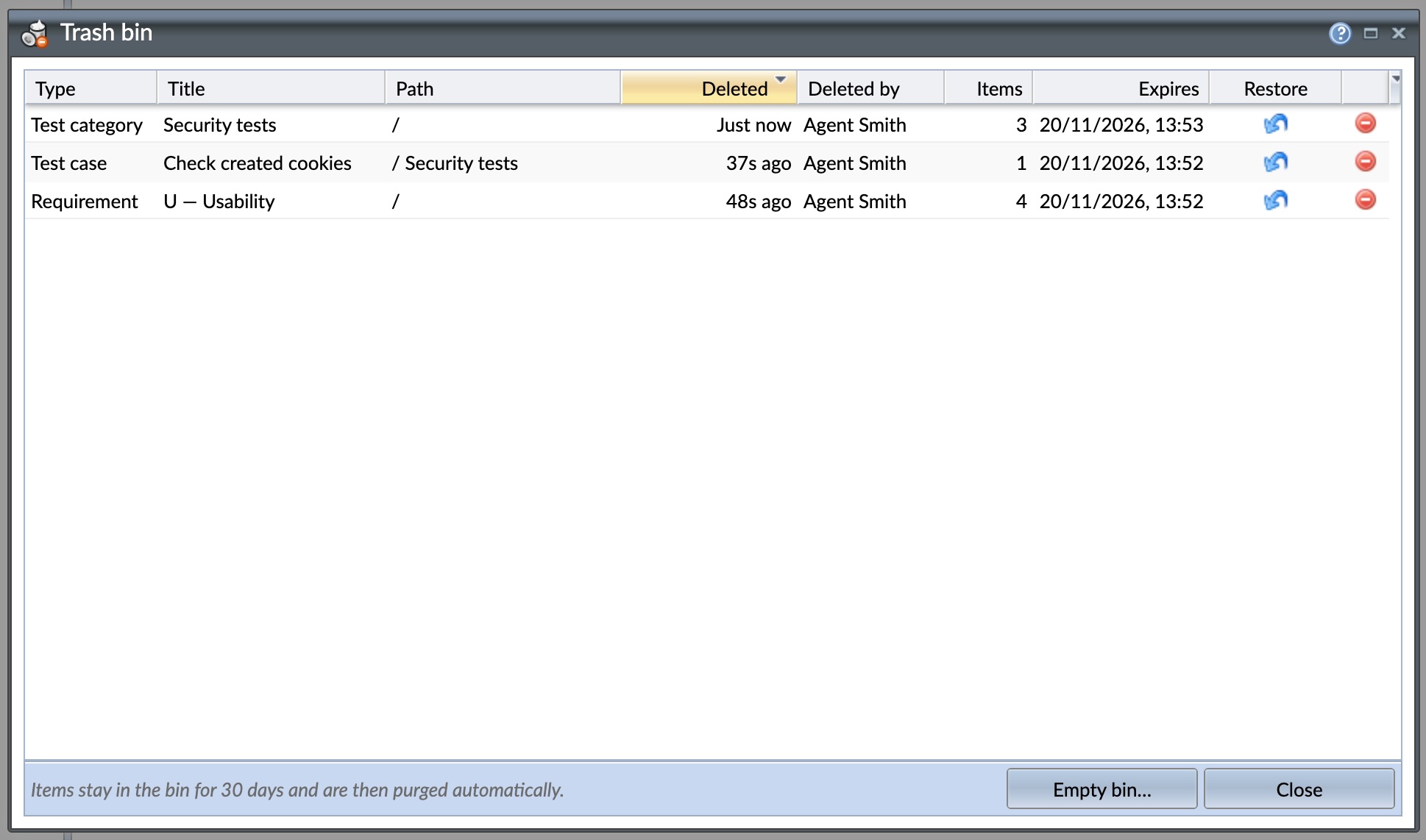 Deleted something by accident? Requirements, test cases, test categories, and issues deleted in Testlab are no longer removed right away – they are moved to the project’s trash bin and can be restored from there for 30 days.
- Restore to the original place — a restored item is put back where it was deleted from, with its original identifier and content. Comments, attachments, tags, history, and asset links come back with it.
- Whole trees in one go — a deleted requirement or test category subtree is kept as a single entry in the bin, so a whole branch of the tree is restored with one click.
- Easy to find — open the bin from the more-actions menus of the specification tree, the test tree and the issue list, or from the Help menu to see all deleted items of the project. The list shows who deleted each item and when, and when it will be purged.
- Permissions — users who can add assets of a type can also restore them. Company admins can purge single entries or empty the whole bin before the retention period ends.
Deleting test cases now also tells you more about what you are about to delete: the confirmation shows the number of test cases to be deleted, how many of them are approved as ready or deprecated, and lists the test runs whose existing results will be lost. Deleting results requires an explicit confirmation.
Specification drafts
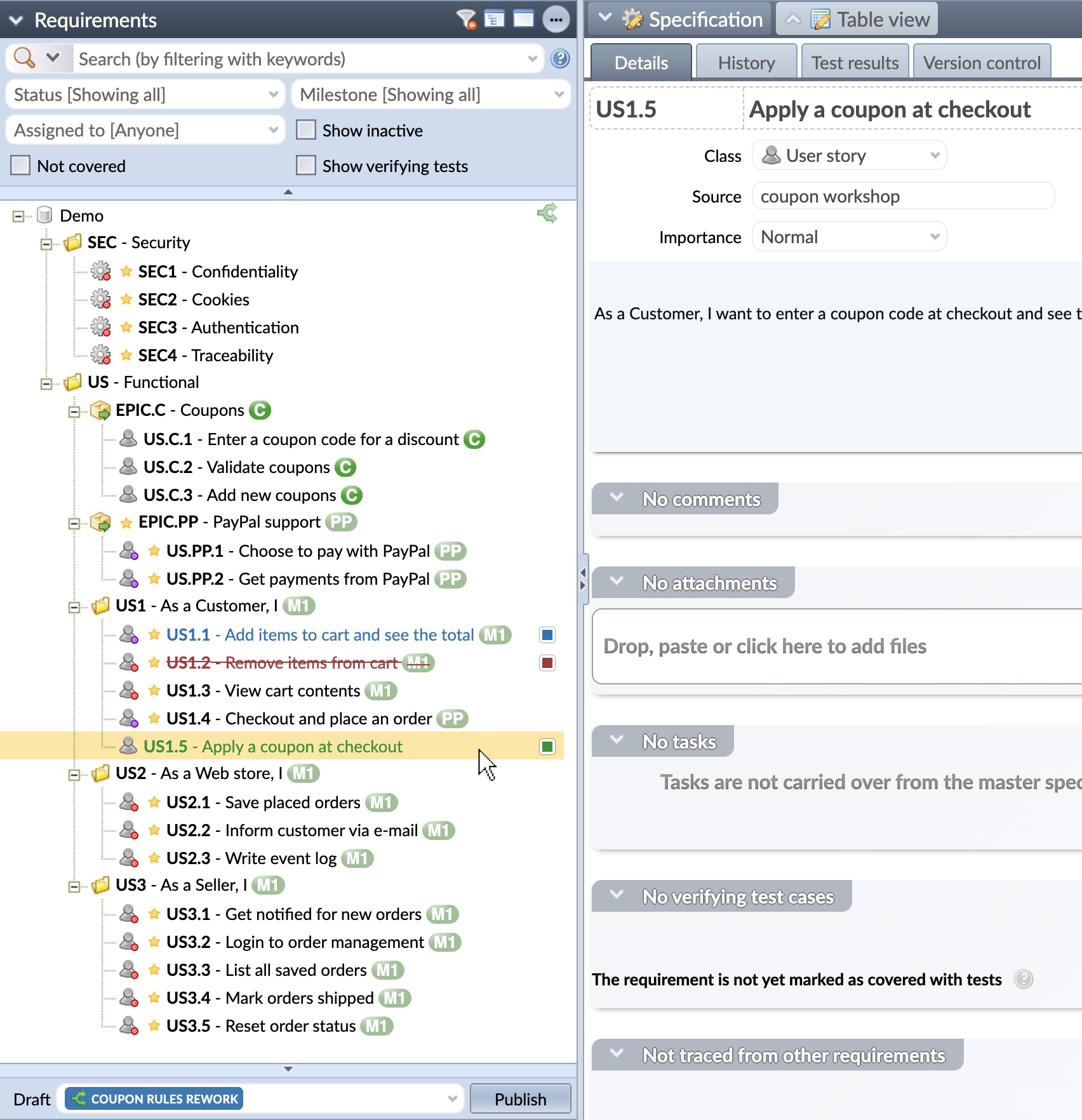 A draft is a set of unpublished changes to the specification. Work on new and changed requirements in a draft while the master specification – the approved, current one – stays untouched until you decide to publish.
- Work in a draft — choose a draft from the selector in the specification tree. Requirements the draft adds, changes, or marks for deletion are highlighted in the tree, the table view, and the search results. A draft can have its own attachments, tasks and links, so development work can start against the drafted requirements before they are approved.
- Review the changes — “Show draft changes” shows a side-by-side comparison of the draft and the master specification. Changes to a single requirement can be discarded at any time.
- Publish — publishing brings the changes into the master specification. Testlab warns you if a requirement has changed in master after the draft was created. Drafts can be kept open after publishing, and published drafts can be re-opened for more work.
- Test against a draft — test cases and tasks can be linked to requirements in a draft, and the links follow the requirements to the master specification when the draft is published. The test coverage view follows the selected draft.
- Plan and report — drafts can be set to target a milestone, and the milestone’s summary lists them with their number of changes. The List of requirements, Requirement grouping, and Requirement coverage reports have a new Draft setting for reporting the specification as the draft would leave it.
Managing and publishing drafts are controlled with new role permissions: requirement.draft.manage and requirement.draft.publish.
AI assistant for test cases
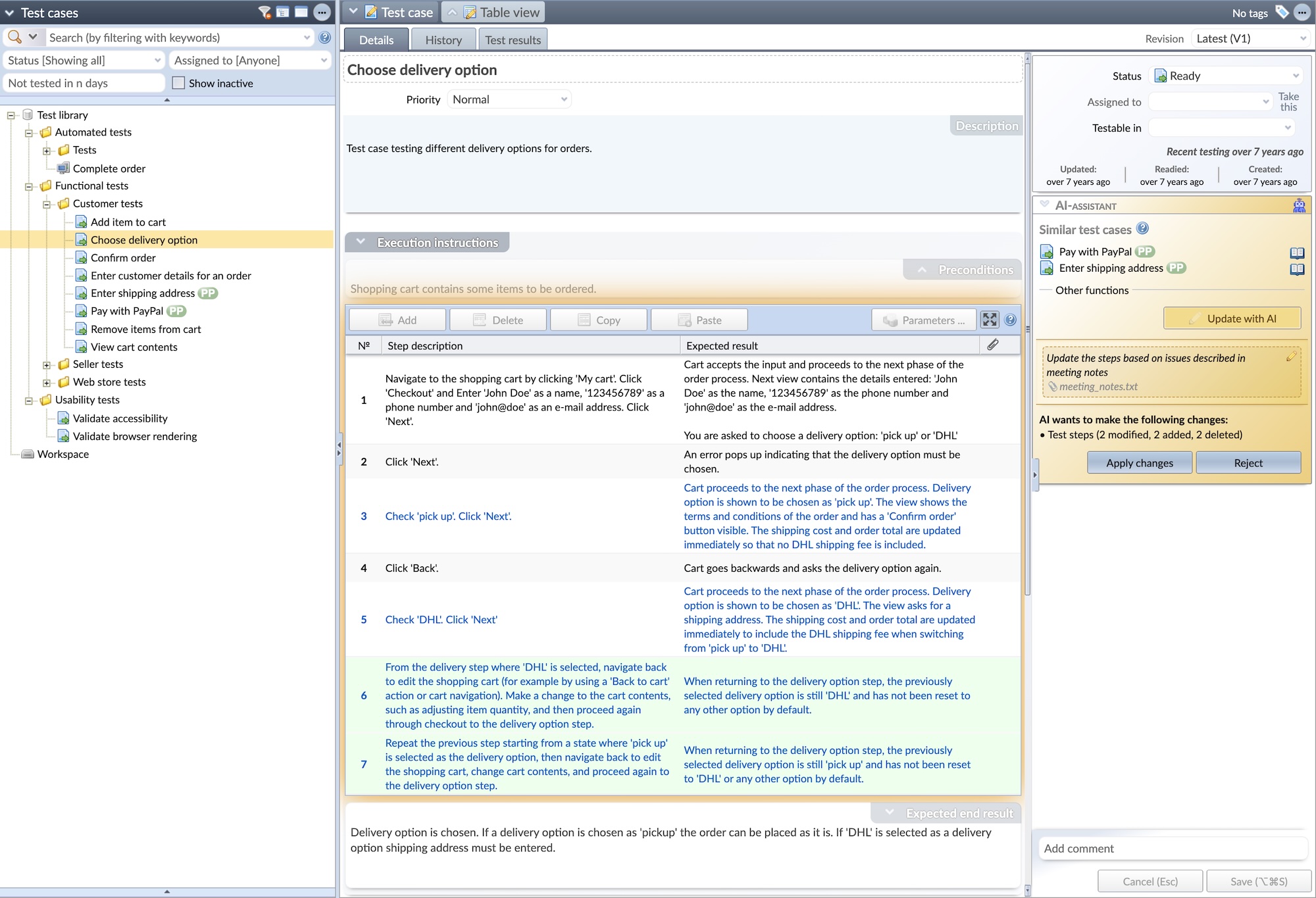 The AI-assistant pane, familiar from the requirement and issue forms, is now available on the test case form too.
- Similar test cases — lists the test cases of the project that are most similar to the open test case. Find duplicates before they are created and spot other tests that may be relevant.
- Update with AI — describe the changes you want, and AI rewrites the test case’s description and steps accordingly. You can attach a file – for example, a specification document, a screenshot, or a spreadsheet – to give the AI more context. The proposed changes – including which steps are modified, added, deleted, or reordered – are shown before anything is saved, and you can apply or reject them.
- Instructions for suggesting improvements — “Suggest improvements” on requirements and issues now lets you tell the AI what to focus on. Instructions can be saved and reused.
REST API for manual testing and reports
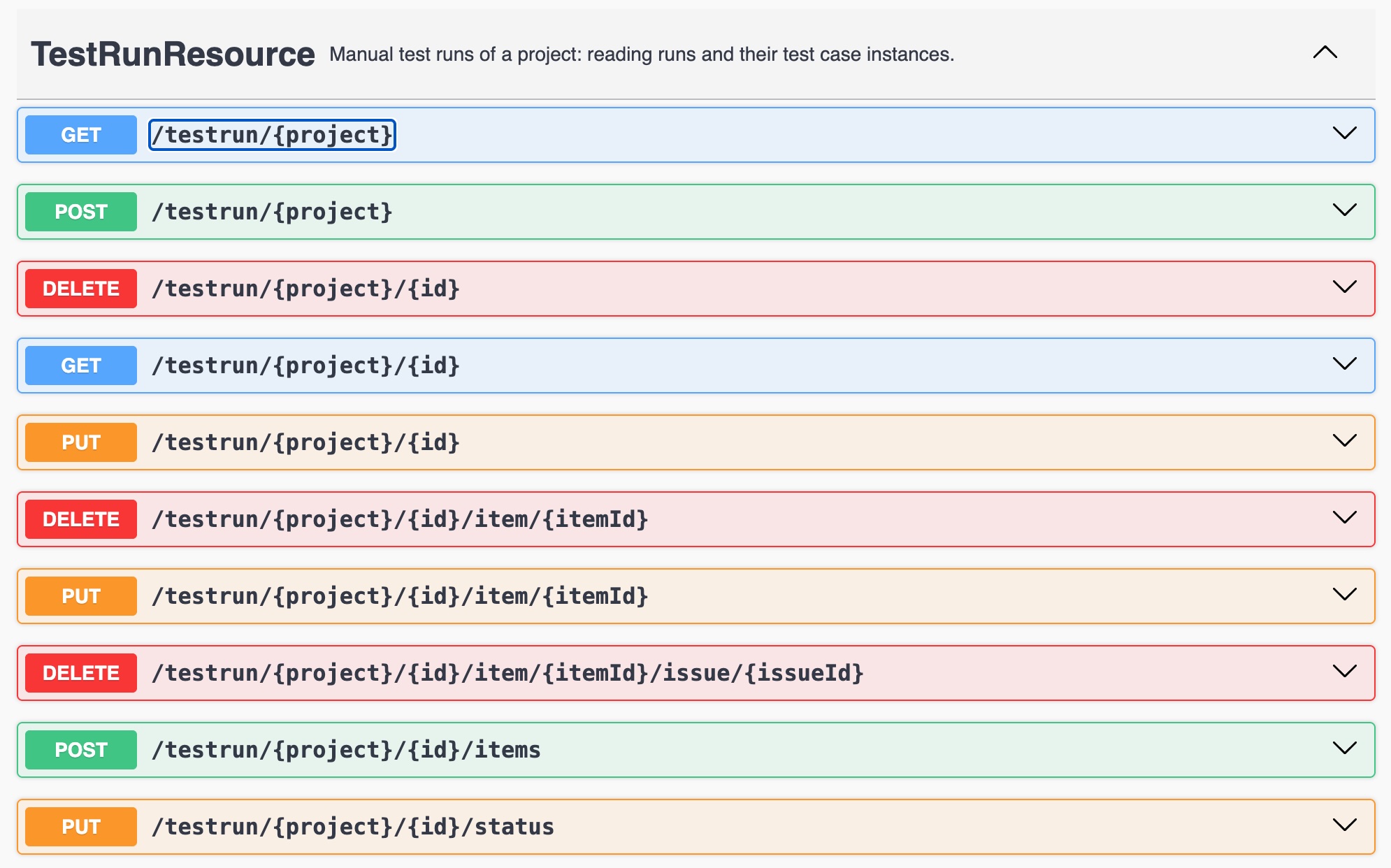 Testlab’s REST API has been extended to cover manual testing end to end, making it possible to plan, execute, and report manual test runs from external tools.
- Test runs — list and read the project’s manual test runs with their test case instances, parameters, steps, and linked issues. Create new runs from a test set, from a list of test cases (the same test case can be added several times with different parameters) or as a copy of an existing run, update run details and content, and start, finish and re-open runs.
- Test results — record the result of a test case instance with step results and comments, execution summary, time taken, and timestamps. Results are recorded in the name of the Testlab user given in the request.
- Issue linking — link Testlab issues to the results, or issues of an integrated issue tracker by their external identifier. For external references, the feature currently supports Mantis BT only, from which issues not yet in Testlab are imported automatically.
- Reports as JSON — run a saved report and get its data as JSON, starting with the Results for run tests report. Reports are run in the background, and the values can be returned either as shown in the report or as stored values.
The new endpoints are documented in the REST API documentation.
Other changes
Adding existing tests to a run again
The Test… function, used to test a requirement, an issue or a task, can now add library tests to a run even if they are already in it. Previously, a test case already in the run was skipped. When you choose to test with library tests and some of them are already in the selected run, a new “Add existing tests to the run again” option is shown. When it is checked, the tests are added as additional test instances, highlighted in blue in the run’s list of tests, and you continue with “Add and run”. This is handy, for example, when retesting a fixed issue or a changed requirement in a run in which the same tests have already been executed – the earlier results are kept, and the tests are executed again as new instances.
Skipped tests in test run statistics
The statistics of a manual test run now show the number of skipped tests.
User’s projects
On the user form, the project the user is currently working in is emphasized in the list of projects, and inactive projects are shown dimmed.
Thanks for all your feedback,
Meliora team
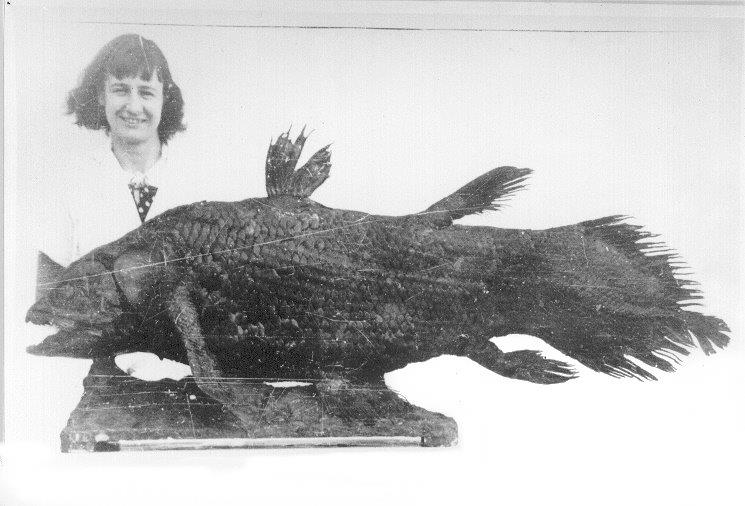 A Lazarus taxon is a species that disappears – from the fossil record or from sight – and is later found again, named after Lazarus, who was raised from the dead. The best-known example is the coelacanth, a fish believed to have died out with the dinosaurs some 66 million years ago. On December 22, 1938, museum curator Marjorie Courtenay-Latimer spotted an odd blue fish in a fisherman’s catch off the east coast of South Africa, near the Chalumna River. Ichthyologist J. L. B. Smith confirmed it was a living coelacanth, and in 1997 a second species was found at a fish market in Indonesia.